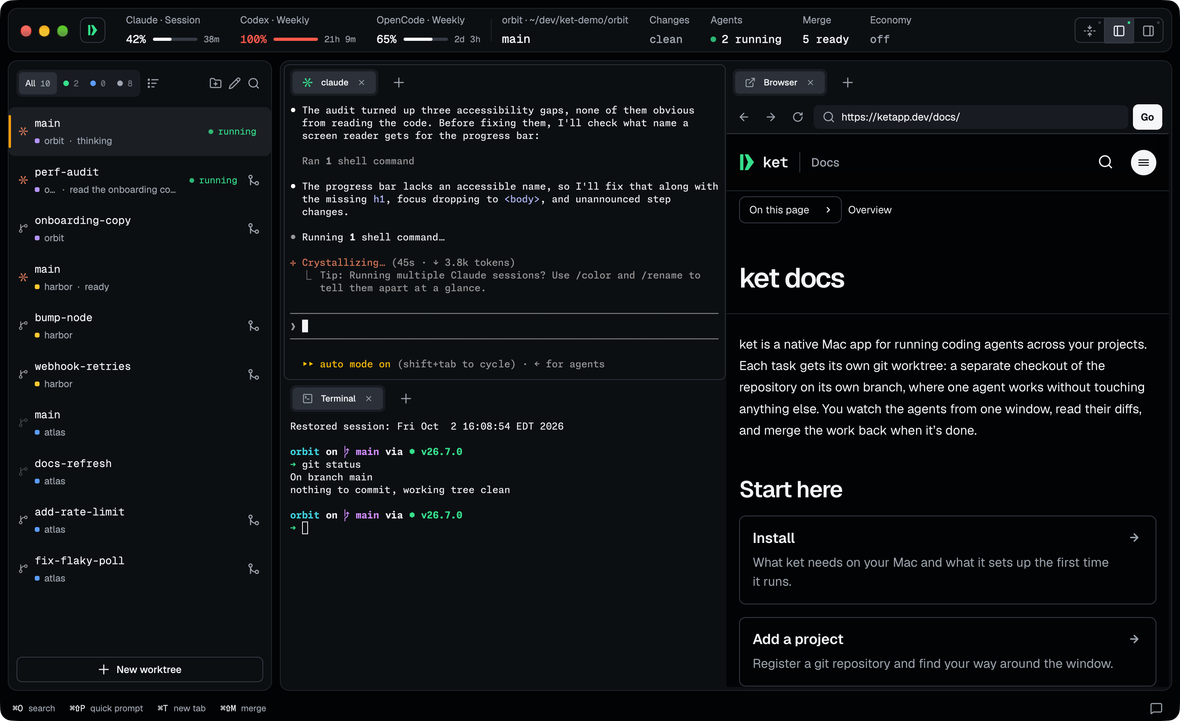
Your day spans more than one repository. ket keeps your projects, worktrees and agents within reach, and the agents you switch away from keep working. How to run agents in parallel.
One sidebar for all your projects
The sidebar lists each project's worktrees and what their agents are doing. You switch codebases with one click.
Know when an agent needs you
An agent that stops for you in another project tells you at once, so you can answer it without checking each project.
Prompt any project from anywhere
Type into the quick prompt to send work to any project, in an existing worktree or a new one, without leaving the one you're in.
Aatlas3
fix-flaky-pollrunning
add-rate-limitwaiting
docs-refresh
Hharbor2
webhook-retriesrunning
bump-nodemerging
Oorbit2
onboarding-copywaiting
perf-auditrunning
add retry with backoff to the webhook sender
Hharbor
webhook-retries
Send⌘↵
Economy
OffLightModerateHeavyMax
Minimal narration, mostly just the result.
Economy7d30dAll
Est. cost$6.40
Est. saved≈$0.92
13% less than Off · 24 sessions
fix-flaky-poll$2.84≈$0.36
add-rate-limit$3.56≈$0.56
Claude · Session18%
resets in 2h 40m
Claude · Weekly42%
resets in 3d 4h
Spend less on the same work.
Economy tells a worktree's agent how much to say, from Off to Max, in Claude Code and Codex. Fewer recaps and less restating means fewer tokens. ket can also trim the noise from build and test output before Claude Code reads it, and shows what every session cost and saved.
On API billing
Every token is on the invoice, and output tokens cost the most. A terser agent writes fewer of them. Once ket sees Claude Code billed per token, it asks for the hour-long prompt cache that plans already get, so a pause for a meeting doesn't reprocess the whole conversation at full price.
On a monthly plan
Session and weekly limits run out on tokens too. The header shows how much of each you've used and when it resets, and a terser agent leaves more of them for the next task.
Quieter command output
An agent rereads every build log and test run on every turn. ket's filter trims a successful run's noise before Claude Code reads it and keeps failures whole: one cargo test went from 2,745 bytes to 275. ket counts what it cut, so that saving is measured, not estimated.
Levels for a team
An organisation can publish a pack whose levels also choose the model, reasoning effort, prompt cache, output cap and command filter. Jev can pick a task's level from its prompt.
Added the limiter and a test for it. Want me to run the whole suite?
Run the testsCommit it
Message Claude
Run it from your iPhone or iPad
Pair with a QR code, then watch your agents, message them and answer their permission prompts. You can start a task or a backlog note from the phone, and review and merge the diff when the agent finishes. The phone reaches your Mac over your own Wi-Fi, or over Tailscale away from home, with end-to-end encryption. How the phone app works.
Economy: Moderate · chosen by Jev (88%)
Claude wants to run a command
$ rm -rf build/
High risk · 94%beta
DenyAllow once
A second opinion from Jev
In beta, with a TypeSafe API key: Jev, TypeSafe's decision model, picks the Economy level for tasks started from your phone, the backlog or the quick prompt, and rates each permission prompt low, medium or high on your phone. It never answers one for you.
claudeiOS Simulator
Home⇧⌘H
Rotate⌘→
Screenshot to agent⌘S
Your app's screen, in a tab
Open the iOS Simulator or the Android Emulator as a tab beside the agent building your app, and press ⌘S to send it a screenshot with your prompt. The iOS Simulator needs Apple silicon and Xcode.
Quick prompt
make the poll interval configurable and add a test for it
Listening…esc stop
Speak your prompt
Dictate into the quick prompt instead of typing. If your Mac can transcribe your language itself, ket keeps the audio on your Mac.
Backlog
Flaky poll test on CI
Retry webhooks with backoffStart
Document the config file
A backlog for every project
Write a task down in one line and come back to it, with a description and files if it needs them. Press Start, and ket makes a worktree for the note and hands the note to an agent. Turn on GitHub sync and ket keeps the project's notes and issues in step.
Merge worktree
src/poll.rsM
tests/poll_interval.rsA
Pull request…Merge
Merge it, or open a pull request
ket lists what it will commit, then commits the work and merges the branch into its base in your primary checkout. It won't switch that checkout's branch for you. Or push the branch as the project's GitHub account and open a pull request, with a title and description you edit first. How to merge parallel work.
Built in Rust, from the ground up.
ket is Rust end to end. It draws its interface on the GPU with no browser underneath, and keeps disk work off the UI thread so the window responds while your agents run.
RustThe app, the engine and the CLI share one language.
GPUgpui draws every frame on the GPU through Metal.
0Electron shells, bundled browsers or JavaScript runtimes.
293msto clone a 20,000-file dependency folder copy-on-write.
Prompt it, or script it.
Any agent that can run a shell can drive ket. Ask yours to start the next backlog item in a new worktree, and it runs the same ket commands you would.
You can script the same engine the app runs on: a worktree you create from a shell shows up in the sidebar.
ket is built to work with different coding agents and models. You choose the agent for each worktree, and the model through that agent or a local Ollama model.
Is ket open source?
Yes, under the MIT license. The Mac app, the ket CLI and the iPhone and iPad app share one repository on GitHub, and issues and pull requests are welcome.
Does my code leave my Mac?
ket doesn't send your code anywhere. Repositories, credentials and agents stay on your Mac; what an agent sends to its own model provider is up to that agent. A paired phone talks to the Mac over your Wi-Fi or your own Tailscale, encrypted end to end. If you add a TypeSafe key for Jev, it receives task prompts and the commands it rates.